搜索中...
🔍

未找到相关结果

Akemi

Rsyslog-登录/命令审计与ES采集

字数统计: 2.6k阅读时长: 13 min
2026/06/27

总体思路

现在我有两台主机,100采集102日志后,通过filebeat采集发送给logstash,Logstash清洗完成后发送给es,es建立索引进行存储

1
2
192.168.10.l00 almalinux9.6 rsyslog服务端 514端口
192.168.10.102 centos7.9 rsyslog客户端

配置客户端

配置cmd记录脚本

简单来说,每次执行命令都会触发这个trap,脚本把命令和信息摘出来,然后把各种信息包括IP、用户名、具体命令,全都通过logger写入日志rsyslog日志

附带了简单的清洗

1
2
3
4
5
6
7
8
9
10
11
12
13
14
15
16
17
18
19
20
21
22
23
24
25
26
27
cat > /etc/profile.d/cmdhistory.sh <<EOF
function history_to_syslog
{
REMOTEHOST=`who am i | awk '{ print $NF }' |awk -F'(' '{ print $NF}' |awk -F')' '{ print $1}'`
cmd=$(history 1 | tail -1)
cmd=$(echo $cmd |awk '{print substr($0,length($1)+2)}')
if [ "$cmd" != "$old_command" ]; then
logger -p local6.debug -- SESSION=$$, from_remote_host=$REMOTEHOST, USER=$USER, SHELL=$SHELL, PWD=$PWD, CMD="${cmd}"
fi
old_command=$cmd
}
trap history_to_syslog DEBUG || EXIT
EOF

# 命令含义
# 获取远程IP
REMOTEHOST=`who am i | awk '{ print $NF }' |awk -F'(' '{ print $NF}' |awk -F')' '{ print $1}'`
# 取最后一条命令
cmd=$(history 1 | tail -1)
# 去掉history的行号,只留命令本身
cmd=$(echo $cmd |awk '{print substr($0,length($1)+2)}')
# 命令去重
if [ "$cmd" != "$old_command" ]; then
# 集合信息,将命令写入rsyslog日志,具体为设施6的debug日志
logger -p local6.debug -- SESSION=$$, from_remote_host=$REMOTEHOST, USER=$USER, SHELL=$SHELL, PWD=$PWD, CMD="${cmd}"
# 挂载钩子,每条命令执行前自动调用函数
trap history_to_syslog DEBUG || EXIT

配置rsyslog

rsyslog配置一方面写到本地文件,一方面转发到远程服务器

1
2
3
4
5
6
7
8
9
10
11
12
13
14
15
16
17
18
19
grep -q "local6.debug" /etc/rsyslog.conf || {
echo "local6.debug /var/log/localmessages" >> /etc/rsyslog.conf
}
touch /var/log/localmessages
chmod 600 /var/log/localmessages

如果rsyslog没有配置,就添加转发:
将设施6的debug日志(操作日志)记录到本地/var/log/localmessages

grep -q "@${REMOTE_IP}" /etc/rsyslog.conf || {
echo "auth.*;authpriv.*;local6.debug @${REMOTE_IP}:${REMOTE_PORT}" >> /etc/rsyslog.conf
}

如果rsyslog没有配置,就添加转发:
将认证(登录)和设施6的debug日志(操作日志)发送到远端服务器
@表示使用udp发送,@@使用tcp

# 重启服务
systemctl restart rsyslog

配置日志轮转

避免本地日志因操作过多,导致的磁盘爆满

1
2
3
4
5
6
7
8
9
10
11
12
cat > /etc/logrotate.d/localmessages << 'EOF'
/var/log/localmessages {
missingok
monthly
rotate 6
create 0600 root root
}
EOF

每月轮转一次
保留6个轮转文件
轮转后新建新的日志文件

完整脚本

1
2
3
4
5
6
7
8
9
10
11
12
13
14
15
16
17
18
19
20
21
22
23
24
25
26
27
28
29
30
31
32
33
34
35
36
37
38
39
40
41
42
43
44
45
46
47
48
49
50
51
52
53
54
55
56
57
58
59
60
61
62
63
64
65
66
67
68
69
70
71
72
73
74
75
76
#!/bin/bash
# ======================================================
# 系统命令审计日志配置脚本(带备份功能)
# 功能:配置本地命令审计日志 + 远程日志转发
# 注意:直接运行即可生效
# ======================================================

# 检查root权限
if [ "$(id -u)" -ne 0 ]; then
echo "错误:必须使用root用户运行此脚本!" >&2
exit 1
fi

# 配置参数
REMOTE_IP="192.168.10.100"
REMOTE_PORT="514"
BACKUP_DIR="/data/yunwei/20250825/backup_$(date +%Y%m%d%H%M%S)"
mkdir -p "$BACKUP_DIR"

# 1. 配置命令审计功能
echo "[1/3] 配置命令审计..."
cat > /etc/profile.d/cmdhistory.sh << 'EOF'
function history_to_syslog
{
REMOTEHOST=`who am i | awk '{ print $NF }' |awk -F'(' '{ print $NF}' |awk -F')' '{ print $1}'`
cmd=$(history 1 | tail -1)
cmd=$(echo $cmd |awk '{print substr($0,length($1)+2)}')
if [ "$cmd" != "$old_command" ]; then
logger -p local6.debug -- SESSION=$$, from_remote_host=$REMOTEHOST, USER=$USER, SHELL=$SHELL, PWD=$PWD, CMD="${cmd}"
fi
old_command=$cmd
}
trap history_to_syslog DEBUG || EXIT
EOF
chmod 755 /etc/profile.d/cmdhistory.sh

# 2. 配置rsyslog日志服务(带备份)
echo "[2/3] 配置rsyslog(原配置已备份到$BACKUP_DIR)..."
# 备份原配置
cp -a /etc/rsyslog.conf "$BACKUP_DIR/rsyslog.conf.bak"

# 本地日志
grep -q "local6.debug" /etc/rsyslog.conf || {
echo "local6.debug /var/log/localmessages" >> /etc/rsyslog.conf
}
# 远程日志
grep -q "@${REMOTE_IP}" /etc/rsyslog.conf || {
echo "auth.*;authpriv.*;local6.debug @${REMOTE_IP}:${REMOTE_PORT}" >> /etc/rsyslog.conf
}
touch /var/log/localmessages
chmod 600 /var/log/localmessages

# 3. 配置日志轮转
echo "[3/3] 配置日志轮转..."
cat > /etc/logrotate.d/localmessages << 'EOF'
/var/log/localmessages {
missingok
monthly
rotate 6
create 0600 root root
}
EOF

# 重启服务
systemctl restart rsyslog

logger -p local6.debug "测试UDP日志转发"

# 完成提示
echo "========================================"
echo "配置已完成!"
echo "备份文件保存在:$BACKUP_DIR"
echo "本地日志:/var/log/localmessages"
echo "远程日志服务器:${REMOTE_IP}:${REMOTE_PORT}"
echo "立即生效:执行 'source /etc/profile'"
echo "========================================"

查看本地日志

1
2
3
4
5
6
7
8
9
10
Jun 26 14:25:51 test root: SESSION=1858, from_remote_host=192.168.10.254, USER=root, SHELL=/bin/bash, PWD=/root, CMD=pwd
Jun 26 14:25:52 test root: SESSION=1858, from_remote_host=192.168.10.254, USER=root, SHELL=/bin/bash, PWD=/root, CMD=sl
Jun 26 14:25:53 test root: SESSION=1858, from_remote_host=192.168.10.254, USER=root, SHELL=/bin/bash, PWD=/root, CMD=ls
Jun 26 14:25:58 test root: SESSION=1858, from_remote_host=192.168.10.254, USER=root, SHELL=/bin/bash, PWD=/root, CMD=cat /etc/rsyslog.conf
Jun 26 14:26:14 test root: SESSION=1858, from_remote_host=192.168.10.254, USER=root, SHELL=/bin/bash, PWD=/root, CMD=vim /etc/rsyslog.conf
Jun 26 14:26:33 test root: SESSION=1858, from_remote_host=192.168.10.254, USER=root, SHELL=/bin/bash, PWD=/root, CMD=systemctl restart rsyslog
Jun 26 14:26:47 test root: SESSION=1858, from_remote_host=192.168.10.254, USER=root, SHELL=/bin/bash, PWD=/root, CMD=cat /etc/rsyslog.conf
Jun 26 14:26:49 test root: SESSION=1858, from_remote_host=192.168.10.254, USER=root, SHELL=/bin/bash, PWD=/root, CMD=ls
Jun 26 14:26:49 test root: SESSION=1858, from_remote_host=192.168.10.254, USER=root, SHELL=/bin/bash, PWD=/root, CMD=pwd
Jun 26 14:26:54 test root: SESSION=1858, from_remote_host=192.168.10.254, USER=root, SHELL=/bin/bash, PWD=/root, CMD=cat /var/log/localmessages

配置服务端-分流操作与登录审计日志

配置udp接受日志,按facility分流,便于清洗

1
2
3
4
5
6
7
8
9
10
11
12
13
14
15
16
17
18
19
20
21
22
23
24
25
26
27
28
29
30
31
32
cat > /etc/rsyslog.d/remote.conf <<'EOF'
module(load="imudp")
input(type="imudp" port="514")

# 命令审计日志-模板
template(name="CmdAudit" type="string"
string="/var/log/remote/%FROMHOST-IP%/audit.log")

# 登录日志-模板
template(name="SecureLog" type="string"
string="/var/log/remote/%FROMHOST-IP%/secure.log")

# 分流规则
if $FROMHOST-IP != '127.0.0.1' then {
if $syslogfacility-text == 'local6' then {
action(type="omfile" dynaFile="CmdAudit")
stop
}
if $syslogfacility-text == 'auth' or $syslogfacility-text == 'authpriv' then {
action(type="omfile" dynaFile="SecureLog")
stop
}
# 其他远程日志(兜底)
action(type="omfile" dynaFile="CmdAudit")
stop
}
EOF
systemctl restart rsyslog.service

$syslogfacility-text内置属性
取值就是facility名称字符串(local6、auth、authpriv等)
在服务端根据客户端发过来的日志自带的facility值做判断。

分流完成的日志

1
2
3
4
5
6
7
8
9
10
11
12
13
14
15
16
17
18
19
20
21
22
23
ls /var/log/remote/192.168.10.102/
audit.log secure.log
(base) [root@1panel ~]# cat /var/log/remote/192.168.10.102/audit.log
Jun 26 15:01:34 test root: SESSION=1858, from_remote_host=192.168.10.254, USER=root, SHELL=/bin/bash, PWD=/root, CMD=pwd
Jun 26 15:01:35 test root: SESSION=1858, from_remote_host=192.168.10.254, USER=root, SHELL=/bin/bash, PWD=/root, CMD=exit
Jun 26 15:01:39 test root: SESSION=3673, from_remote_host=192.168.10.254, USER=root, SHELL=/bin/bash, PWD=/root, CMD=exit
Jun 26 15:01:41 test root: SESSION=3673, from_remote_host=192.168.10.254, USER=root, SHELL=/bin/bash, PWD=/root, CMD=ls
Jun 26 15:01:42 test root: SESSION=3673, from_remote_host=192.168.10.254, USER=root, SHELL=/bin/bash, PWD=/root, CMD=pwd
(base) [root@1panel ~]# cat /var/log/remote/192.168.10.102/secure.log
Jun 26 15:01:35 test sshd[1843]: Received disconnect from 192.168.10.254 port 59050:11: disconnected by user
Jun 26 15:01:35 test sshd[1843]: Disconnected from 192.168.10.254 port 59050
Jun 26 15:01:35 test sshd[1843]: pam_unix(sshd:session): session closed for user root
Jun 26 15:01:35 test systemd-logind: Removed session 2.
Jun 26 15:01:35 test sshd[1847]: pam_unix(sshd:session): session closed for user root
Jun 26 15:01:35 test systemd-logind: Removed session 3.
Jun 26 15:01:38 test sshd[3665]: Nasty PTR record "192.168.10.254" is set up for 192.168.10.254, ignoring
Jun 26 15:01:38 test sshd[3665]: Accepted password for root from 192.168.10.254 port 55129 ssh2
Jun 26 15:01:38 test systemd-logind: New session 14 of user root.
Jun 26 15:01:38 test sshd[3665]: pam_unix(sshd:session): session opened for user root by (uid=0)
Jun 26 15:01:38 test sshd[3669]: Nasty PTR record "192.168.10.254" is set up for 192.168.10.254, ignoring
Jun 26 15:01:38 test sshd[3669]: Accepted password for root from 192.168.10.254 port 55131 ssh2
Jun 26 15:01:39 test systemd-logind: New session 15 of user root.
Jun 26 15:01:39 test sshd[3669]: pam_unix(sshd:session): session opened for user root by (uid=0)

配置filebeat转发

1
2
3
4
5
6
7
8
9
10
11
12
13
14
15
16
17
18
19
20
21
22
23
24
25
26
27
# /etc/filebeat/filebeat.yml

filebeat.inputs:

# input 1: 采集 audit.log
- type: filestream
id: cmd-audit
paths:
- /var/log/remote/*/audit.log
fields:
log_type: cmd_audit
fields_under_root: true
prospector.scanner.fingerprint.length: 64
# input 2: 采集 secure.log
- type: filestream
id: secure-log
paths:
- /var/log/remote/*/secure.log
fields:
log_type: secure
fields_under_root: true

# 输出到 Logstash
output.logstash:
hosts: ["192.168.10.100:5044"]

systemctl restart filebeat.service

字段解释

fields:
log_type: secure
fields_under_root: true
表示新添加一个自定义字段fields,包含键值对log_type: secure
并且包装在json最外层

配置logstash数据清洗

新增logstash子配置文件,使用grok清洗一下

思路说明:

两种日志→条件分发→grok解析→时间轴纠偏→发给es

1
2
3
4
5
6
7
8
9
10
11
12
13
14
15
16
17
18
19
20
21
22
23
24
25
26
27
28
29
30
31
32
33
34
35
36
37
38
39
40
41
42
43
44
45
46
47
48
49
50
51
52
53
54
55
56
57
58
59
60
61
62
63
64
65
66
67
目标日志:
Jun 26 15:01:35 test sshd[1843]: Received disconnect from 192.168.10.254 port 59050:11: disconnected by user
Jun 26 15:01:35 test sshd[1843]: Disconnected from 192.168.10.254 port 59050
Jun 26 15:01:35 test sshd[1843]: pam_unix(sshd:session): session closed for user root
Jun 26 15:01:35 test systemd-logind: Removed session 2.

Jun 26 15:01:34 test root: SESSION=1858, from_remote_host=192.168.10.254, USER=root, SHELL=/bin/bash, PWD=/root, CMD=pwd

vim /etc/logstash/conf.d/audit-pipeline.conf
input {
beats {
port => 5044
}
}

filter {
# 根据 filebeat 传过来的 fields 做不同解析
if [log_type] == "cmd_audit" {
grok {
match => {
"message" => '%{SYSLOGTIMESTAMP:timestamp} %{HOSTNAME:host} %{USER:facility}: SESSION=%{NUMBER:session}, from_remote_host=%{IPORHOST:remote_ip}, USER=%{WORD:user}, SHELL=%{PATH:shell}, PWD=%{PATH:pwd}, CMD=%{GREEDYDATA:cmd}'
}
}
}
else if [log_type] == "secure" {
grok {
match => {
"message" => '%{SYSLOGTIMESTAMP:timestamp} %{HOSTNAME:host} %{PROG:program}\[%{NUMBER:pid}\]: %{GREEDYDATA:log_message}'
}
}
}

# 通用:解析 timestamp 为 @timestamp
date {
match => ["timestamp", "MMM dd HH:mm:ss", "MMM d HH:mm:ss"]
target => "@timestamp"
}

# 清理不需要的字段
mutate {
remove_field => ["timestamp"]
}
}

# 按照日志类型区分发送
output {
if [log_type] == "cmd_audit" {
elasticsearch {
hosts => ["https://localhost:9200"]
index => "audit-cmd-%{+YYYY.MM.dd}"
user => "elastic"
password => "123456"
ssl_verification_mode => "none"
}
}
else if [log_type] == "secure" {
elasticsearch {
hosts => ["https://localhost:9200"]
index => "audit-secure-%{+YYYY.MM.dd}"
user => "elastic"
password => "123456"
ssl_verification_mode => "none"
}
}
}

systemctl restart logstash.service

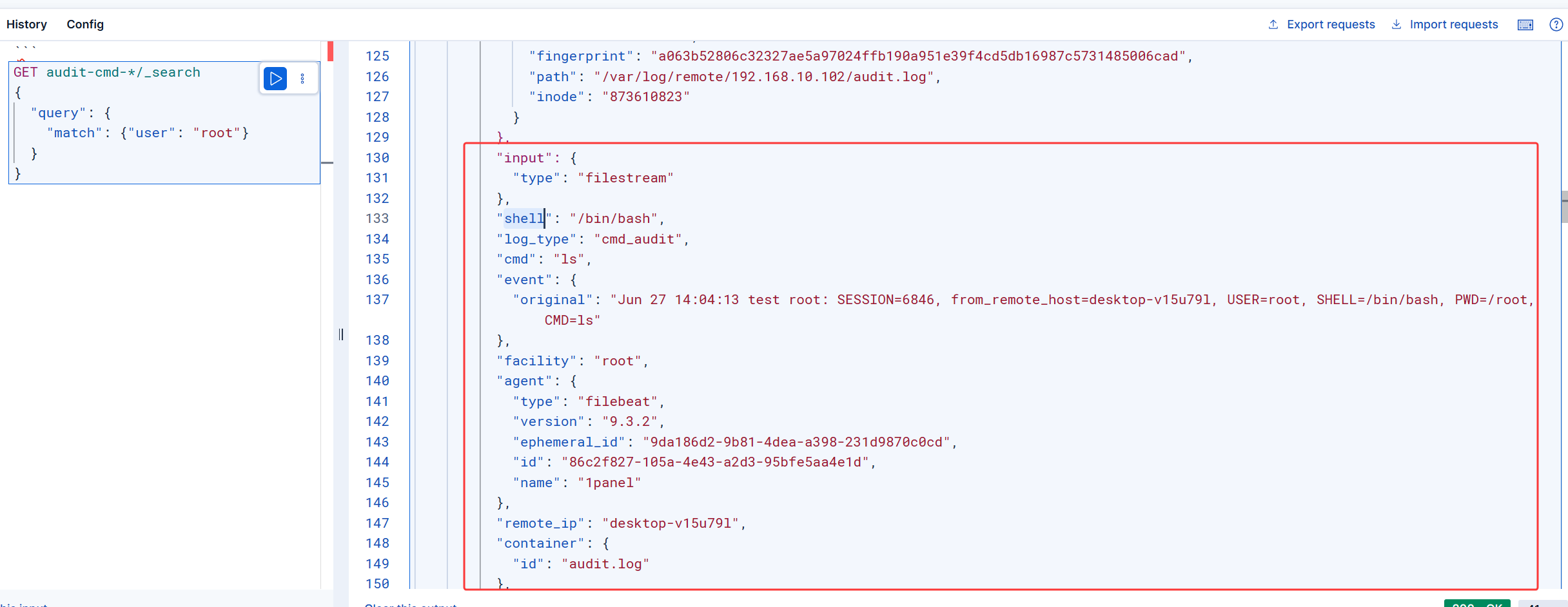
验证:查看es中是否存在日志

就用自动的索引,索引模板不是不是很想创建了

CATALOG
  1. 1. 总体思路
  2. 2. 配置客户端
    1. 2.1. 配置cmd记录脚本
    2. 2.2. 配置rsyslog
    3. 2.3. 配置日志轮转
    4. 2.4. 完整脚本
    5. 2.5. 查看本地日志
  3. 3. 配置服务端-分流操作与登录审计日志
  4. 4. 配置filebeat转发
  5. 5. 配置logstash数据清洗
  6. 6. 验证:查看es中是否存在日志