需要手动安装pip3 install flask
Flask 是一个用 Python 编写的轻量级 Web 框架,主要用于快速开发 Web 应用程序和 API,它提供了一些基本的功能,可以快速开始,而不需要从头写很多代码。
核心功能
Flask:Hello World 1 2 3 4 5 6 7 8 9 10 11 12 13 14 15 16 17 18 from flask import Flaskapp = Flask(__name__) @app.route('/' def home (): return 'Hello, world' if __name__ == '__main__' : app.run(debug=True )
自定义路由 和nginx类似,定义了路由(路径)装饰器装饰器后,访问该目录就会返回
定义的函数返回的内容
1 2 3 4 5 6 7 8 9 10 @app.route('about' def about (): return "It's an About page" @app.route('/login' ,methods=['POST' ] def login (): username = request.form['username' ] return f"Welcome,{username} "
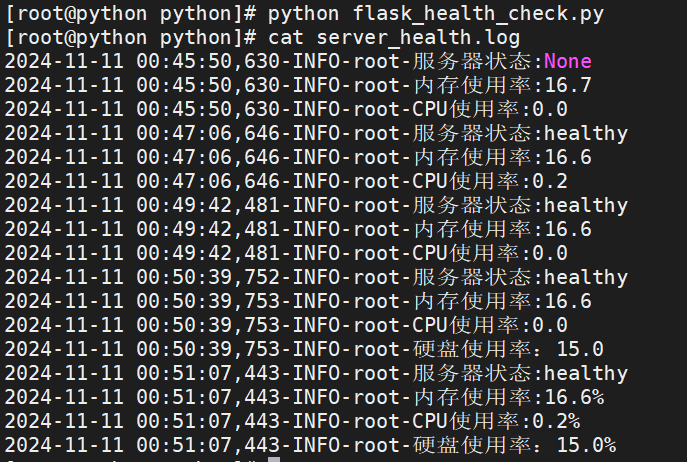
案例:服务器状态监控API 自动化监控:定期检查资源使用情况
1 2 3 4 5 6 7 8 9 10 11 12 13 14 15 16 17 18 19 20 21 22 23 24 25 26 27 28 29 30 from flask import Flask,jsonifyimport psutilapp=Flask(__name__) @app.route('/api/health' ,methods=['GET' ] def health_check (): cpu_usage=psutil.cpu_percent(interval=1 ) mem=psutil.virtual_memory() mem_usage=mem.percent disk=psutil.disk_usage('/' ) disk_usage=disk.percent status='healthy' if cpu_usage > 80 or mem_usage >80 or disk_usage > 80 : status='unhealthy' return jsonify({ 'status' :status, 'cpu_usage' : cpu_usage, 'mem_usage' : mem_usage, 'disk_usage' : disk_usage }) if __name__ == '__main__' : app.run(host='0.0.0.0' ,port=5000 )
API获取数据
1 2 3 4 5 6 7 8 9 10 11 12 13 14 15 16 17 18 19 20 21 22 23 24 25 26 27 28 29 30 31 32 33 34 35 36 37 38 39 40 41 42 43 44 45 46 47 48 import requestsimport loggingfrom logging import Formatterlogging.basicConfig(level=logging.INFO, filename='server_health.log' , encoding='utf-8' , format ="%(asctime)s-%(levelname)s-%(name)s-%(message)s" , datefmt='%Y-%m-%d-%H:%M:%S' ) formatter=Formatter('%(asctime)s-%(levelname)s-%(name)s-%(message)s' ) for handler in logging.getLogger().handlers: handler.setFormatter(formatter) url='http://127.0.0.1:5000/api/health' threshold_cpu=80 threshold_mem=80 threshold_disk=80 def check_server_health (): response=requests.get(url) if response.status_code == 200 : data=response.json() cpu_usage=data.get('cpu_usage' ) mem_usage=data.get('mem_usage' ) disk_usage=data.get('disk_usage' ) status=data.get('status' ) if cpu_usage > threshold_cpu: logging.warning(f'告警:CPU使用率达到{cpu_usage} %,超过阈值{threshold_cpu} ' ) if mem_usage > threshold_mem: logging.warning(f'告警:MEM使用率达到{mem_usage} %,超过阈值{threshold_mem} ' ) if disk_usage > threshold_disk: logging.warning(f'告警:硬盘使用率达到{disk_usage} %,超过阈值{threshold_disk} ' ) logging.info(f"服务器状态:{status} " ) logging.info(f"内存使用率:{mem_usage} %" ) logging.info(f"CPU使用率:{cpu_usage} %" ) logging.info(f"硬盘使用率:{disk_usage} %" ) else : print ("无法获取服务器状态" ) if __name__=='__main__' : check_server_health()
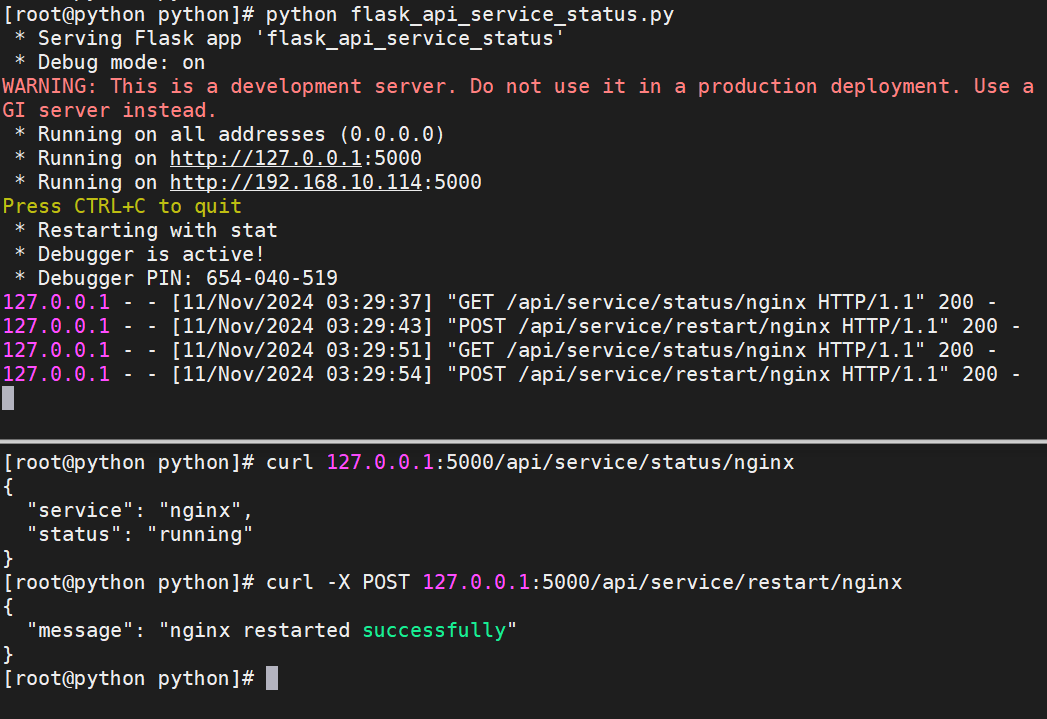
案例:服务状态检查与重启API 1 2 3 4 5 6 7 8 9 10 11 12 13 14 15 16 17 18 19 20 21 22 23 24 25 26 27 28 29 30 31 32 from flask import Flask,jsonifyimport subprocessapp=Flask(__name__) @app.route('/api/service/status/<service>' ,methods=['GET' ] def service_status_check (service ): sts=subprocess.run(["systemctl" ,"is-active" ,service],capture_output=True ,text=True ) output=sts.stdout.strip() if output == 'active' : status = 'running' elif output == 'inactive' : status = 'stopped' else : status = 'unknown' return jsonify({ 'service' : service, 'status' : status }) @app.route('/api/service/restart/<service>' ,methods=['POST' ] def service_restart (service ): result=subprocess.run(["systemctl" ,"restart" ,service],capture_output=True ,text=True ) if result.returncode == 0 : return jsonify({'message' : f"{service} restarted successfully" }) else : return jsonify({'message' : f"Failed to restarted {service} " }) if __name__ == '__main__' : app.run(debug=True ,host='0.0.0.0' ,port=5000 )